Stop surprise AI bills on your WordPress site
WordPress 7.0 lets every plugin use your AI provider account. AI Cost Governor shows you who is spending it, and stops the spending when the budget runs out.
AI is in WordPress core now. So is the bill.
Since WordPress 7.0 you add your own Anthropic, OpenAI or Google API key under Settings → Connectors, and from then on any plugin can use it. SEO writers, product description generators, chatbots, image tools… each one bills your account.
WordPress itself does not tell you which plugin made which request, how much it cost, or stop anything when you have spent enough. A single plugin rewriting a catalogue overnight, or a public chatbot getting hammered, can cost more than your hosting does in a year. You find out when the invoice arrives.
Everything you need to keep AI spend under control
Know who spends what
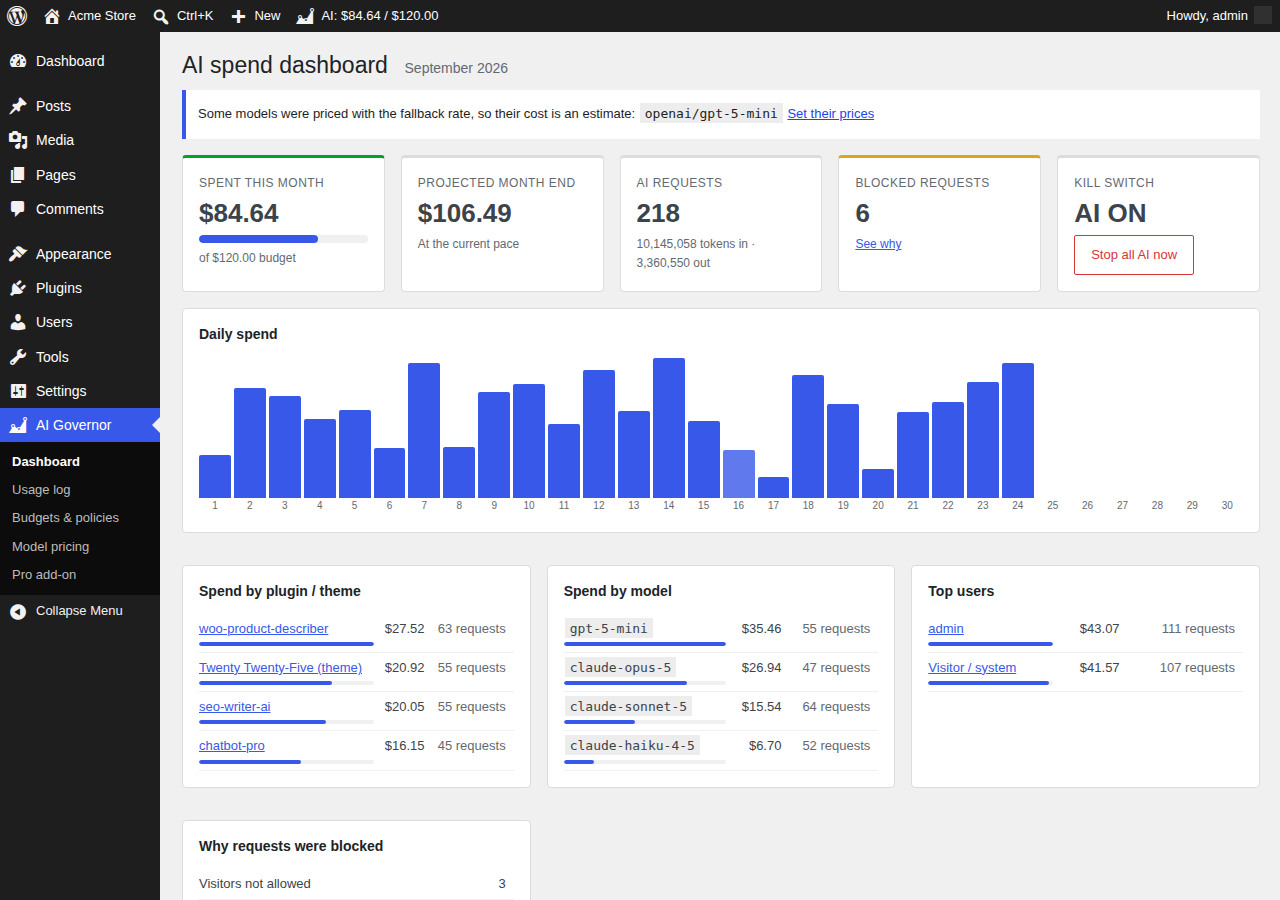
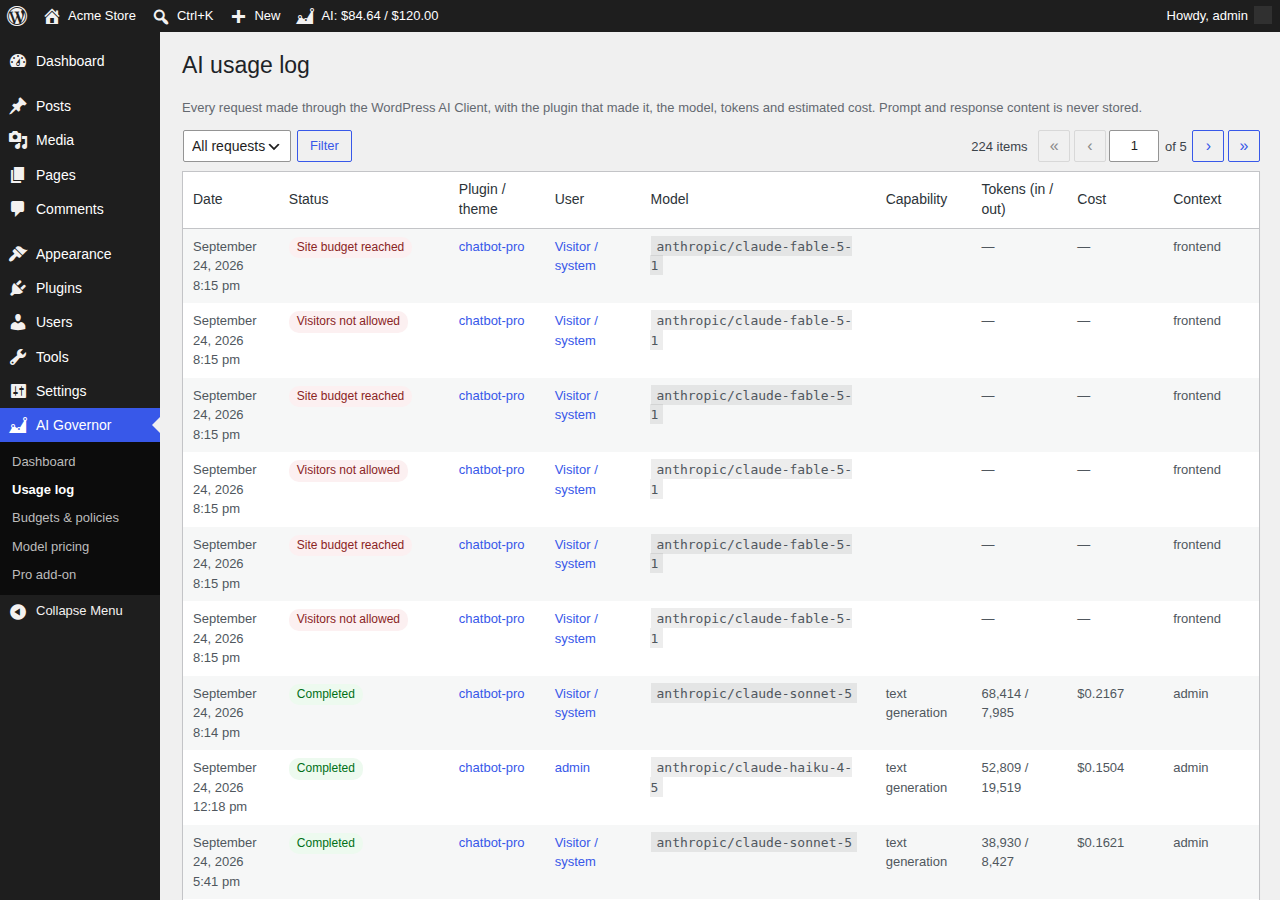
Every AI request is logged with the plugin or theme that made it, the user, the model, the tokens and the estimated cost. No prompt or response content is ever stored.
A monthly budget that is enforced
Once the budget is used up, further AI requests are refused before they reach your provider, so they cost nothing. Well-behaved plugins also hide their AI buttons.
A kill switch
Something looks wrong? One click, or wp ai-governor kill-switch on, and every AI request on the site stops immediately.
Projection and alerts
See where the month will end at the current pace, and get an email at 80% and 100% of your budget.
Who may use AI
Allow AI only for some roles, and decide whether logged-out visitors (chatbots, public forms) may trigger it at all.
Built on core, open to developers
Uses only the official AI Client hooks. Abilities API endpoints, WP-CLI commands and filters let agents and other plugins check the budget before spending.
Up and running in two minutes
1. Install
Plugins → Add New → search «AI Cost Governor». It is free and needs WordPress 7.0 or later.
2. Set a budget
AI Governor → Budgets & policies. Enter your monthly limit and leave the hard limit on.
3. Watch the dashboard
From now on every AI request shows up, with its plugin, model and cost. Nothing else to configure.
Pricing
The free plugin is complete on its own. Pro is an optional add-on for agencies, shops and newsrooms.
Free
0 €
- Usage log and cost per request
- Spend by plugin, model and user
- Site-wide monthly budget with hard stop
- Kill switch
- Role restrictions
- Email alerts at 80% and 100%
- 30 days of history
Pro
9 € / month
- Everything in Free, for 1 site
- Budgets per plugin, role and user
- Block plugins from using AI
- Approved-model list
- Disable image, video or audio generation
- Hourly rate limits per user
- Slack / Teams alerts, custom thresholds
- CSV export, 365 days of history
Agency
29 € / month
- Everything in Pro
- Up to 25 sites
- CSV exports to bill AI costs back to each client
- Priority email support
Monthly subscription, cancel anytime. Prices include VAT where applicable; payments are processed by Lemon Squeezy. 14-day money-back guarantee on your first payment.
Frequently asked questions
How accurate are the costs?
Token counts come straight from your provider’s response. Costs are estimated from an editable price table (Anthropic’s list prices come pre-filled; add the prices of the other models you use). Always compare with your provider’s invoice.
Can a budget still be exceeded?
Slightly. The cost of a request is only known when it finishes, so the request that crosses the limit completes and the next one is blocked. Set your budget with a small margin.
Does it send my data anywhere?
The free plugin never contacts any external server. Everything stays in your database. The Pro add-on only contacts Lemon Squeezy to check your license and our update server to download updates.
What happens if I cancel Pro?
Your site keeps running with the free features. Your Pro settings are kept, so they come back if you subscribe again.
Which AI providers does it support?
Any provider connected to the WordPress AI Client (Anthropic, OpenAI, Google and others through provider plugins), because it works at the level of WordPress core, not of a specific provider.